
Microsoft is fueling AI innovation
Decades
of research & development
Committed to advancing Responsible AI
Secure from
the start
Reliability & performance at scale for large AI models
Microsoft is fueling AI innovation
Your data is your data
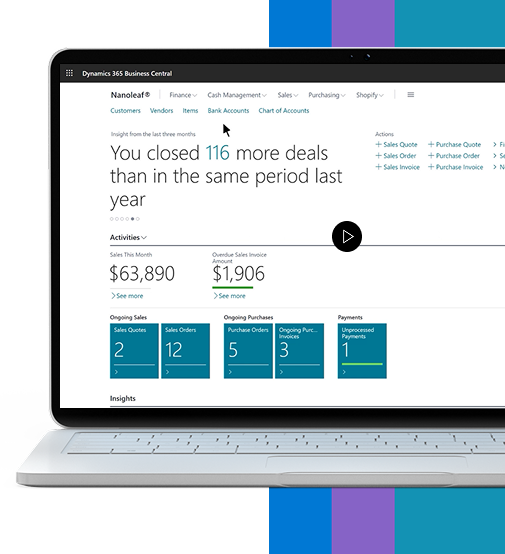
Copilot in Dynamics 365 Business Central
Your everyday AI companion, improving the way work gets done.
- Get answers quickly and easily using natural language.
- Spark creativity with creative content ideas.
- Save time by automating tedious, repetitive tasks.
Anticipate and overcome business challenges

Make Copilot
Available
Create a foundation for
AI-driven innovation
Establish data security, user access, and company policies

Solution
Optimization
Establish accurate, complete, current data
Define the personas, scenarios, and process improvements

Develop
AI Aptitude
Develop the skills to work alongside Copilot
Drive adoption and manage organizational change

Maximize
Business Value
Identify and quantify the value (ROI) generated
Copilot increases revenue, optimizes costs, and helps employees thrive

Scale
Adoption
Empower all employees to realize the benefits of Copilot
Support continuous improvement
Use Cases
Boosting Efficiency with Microsoft Copilot
Automated Reporting: Copilot generates financial reports automatically, reducing the time spent on manual data collection and ensuring accuracy.
Budgeting and Forecasting: Use predictive analytics to create accurate budgets and forecasts, allowing for better financial planning and resource allocation.
Expense Tracking: Automate the tracking of expenses and identify cost-saving opportunities by analysing spending patterns and suggesting optimisations.
Demand Forecasting: Predict customer demand more accurately, helping to maintain optimal inventory levels and reduce the risk of stockouts or overstocking.
Inventory Management: Automate inventory tracking and reorder processes, ensuring that stock levels are always optimised based on real-time sales data.
Supplier Management: Improve relationships with suppliers by automating purchase orders, tracking deliveries, and ensuring timely payments.
Logistics Optimisation: Optimise logistics and transportation routes, reducing delivery times and transportation costs.
Sales Forecasting: Use AI to predict future sales trends, helping sales teams to focus on high-potential leads and opportunities.
Customer Insights: Gain deeper insights into customer behaviour and preferences, enabling personalised marketing and sales strategies.
Automated Customer Service: Automate routine customer service tasks, such as answering common queries and processing returns, allowing customer service agents to focus on more complex issues.
Customer Relationship Management: Enhance CRM by providing sales and service teams with real-time insights and recommendations on how to engage with customers effectively.
Recruitment: Automate the initial stages of recruitment, such as resume screening and interview scheduling, to streamline the hiring process.
Employee Onboarding: Simplify onboarding by automating the creation of training schedules, task assignments, and paperwork.
Performance Management: Use AI to monitor employee performance, identify areas for improvement, and suggest personalised development plans.
Employee Engagement: Analyse employee feedback and engagement data to create strategies that improve workplace satisfaction and retention.
Campaign Optimisation: Use predictive analytics to determine the best times to launch marketing campaigns and the most effective channels to use.
Content Creation: Automate the generation of marketing content, such as social media posts and email newsletters, based on data-driven insights.
Audience Segmentation: Identify and target specific customer segments with personalised marketing messages.
Performance Tracking: Monitor the performance of marketing campaigns in real-time and make adjustments as needed to maximise ROI.
Optimisation Tips
Microsoft Dynamics 365 Business Central can offer a lot more than just the above, so make sure to utilise every area for maximum efficiency, performance and productivity. Here’s are our top 4 tips to boost Business Central just that extra mile:
Customise Workflows
Streamline operations by tailoring workflows to match your firm’s unique structure in Business Central.
Leverage Extensions and Add-ons
Enhance the functionality of Business Central by utilising a range of extensions and add-ons.
Utilise Reporting Tools
Gain deeper insights into financial performance by leveraging the powerful reporting tools in Business Central.
Stay Updated
Ensure optimal performance and security by keeping your Business Central system up-to-date with the latest features and improvements.
Contact Us
2nd floor Complex Grand Baie Coeur de Ville Avenue Notre Dame de la Salette Grand Baie Mauritius